Apple unveiled iOS 27 at WWDC on June 8, 2026, and after months of developer and public betas, the update is rolling out to iPhones this September. It isn’t a ground-up visual overhaul like some past releases — instead, Apple spent this cycle on two things: making Siri genuinely useful, and fixing the small annoyances that pile up over a year of daily use. If you’re wondering what’s actually in iOS 27 and whether your iPhone will run it well, here’s the breakdown.
When Is iOS 27 Releasing?
iOS 27 is expected to roll out publicly around mid-September 2026, following Apple’s usual pattern of releasing the finished version alongside its new iPhone lineup. The developer and public betas have been available since June, and by the final beta rounds, Apple had ironed out most of the rough edges reported earlier in the cycle.
One thing to know upfront: Siri’s biggest AI upgrade won’t necessarily be ready the same day iOS 27 launches. Apple has said a Siri AI beta will arrive in English “later in 2026,” meaning some of what’s covered below may show up as a follow-up update rather than on day one.
What’s New in iOS 27
A Wallpaper That Adapts to Every Screen
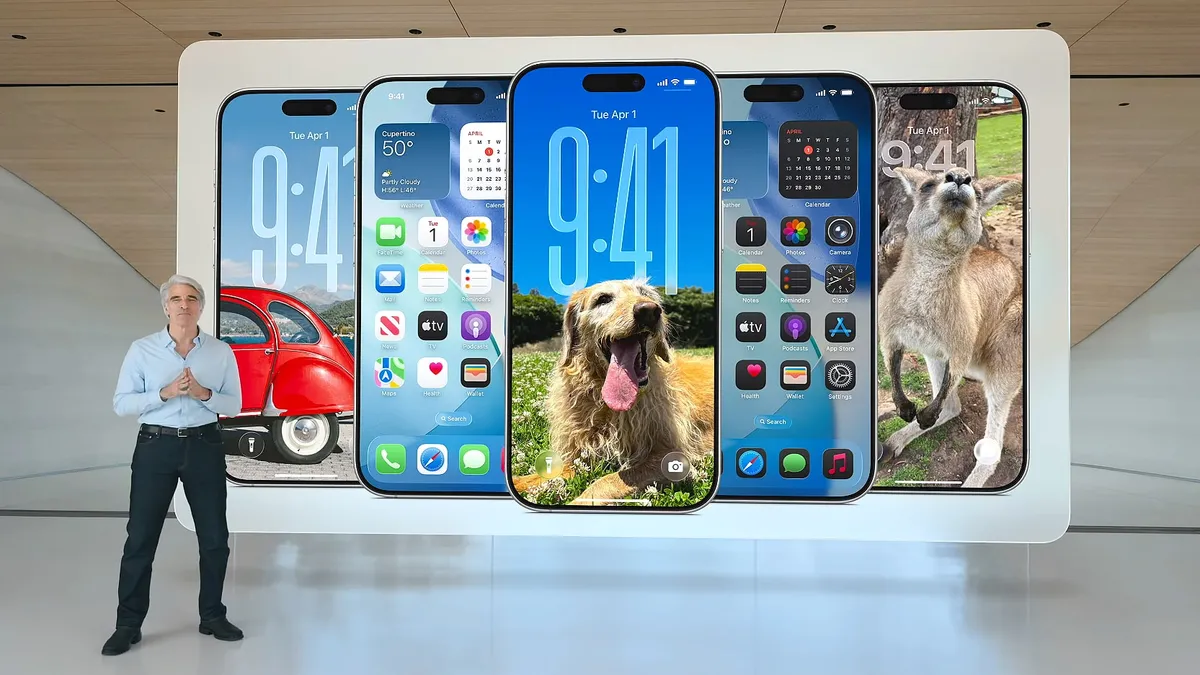
One of the more visually memorable additions is the new wallpaper extension feature. Pick a single photo, and Apple Intelligence automatically extends it beyond its original frame so it fills the entire Lock Screen naturally — no more awkward cropping or a photo that only looks right on one aspect ratio. In Apple’s own demo, the same source photo was shown adapting cleanly across five different iPhones side by side, each with a slightly different framing but no visible stretching or distortion. It’s a small feature, but one of those things that’s hard to go back from once you’ve used it.
Siri Gets Rebuilt Around Generative AI
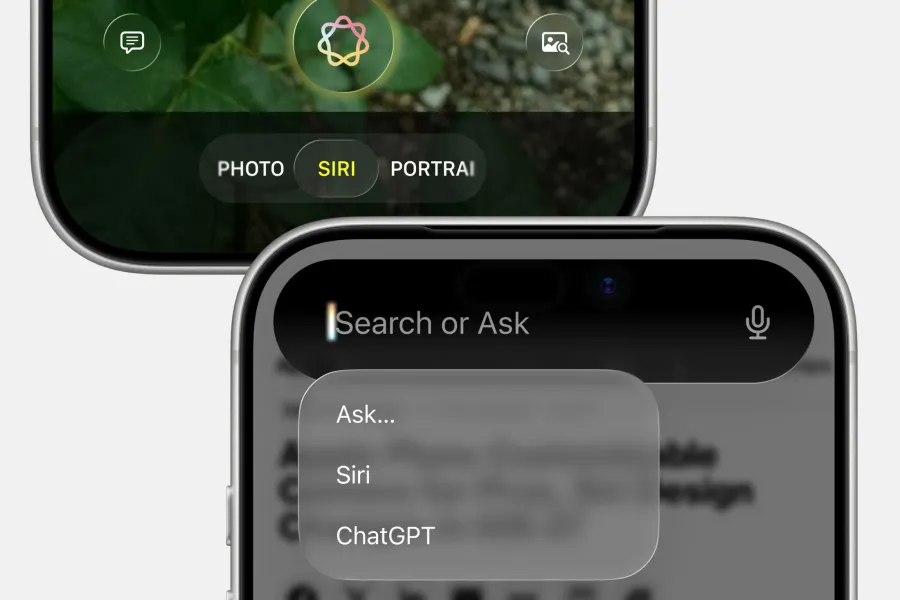
This is the headline feature of iOS 27. Siri has been rebuilt around a generative AI model, with the goal of finally handling follow-up questions, understanding what’s on your screen, digging through your email for specific information, and completing multi-step tasks inside apps — the kind of assistant behavior competitors have offered for a while. In the new Camera Control interface, Siri now sits as its own dedicated mode alongside Photo and Portrait, and the system-wide search bar lets you choose between Siri and ChatGPT depending on what you’re asking.
Early beta testing has shown steady improvement: Siri AI responds noticeably faster than it did in the first beta, and the gap between it and assistants like Gemini has narrowed with each update. That said, it’s still not flawless — one recurring issue in testing is that Siri sometimes cuts off longer spoken requests before the user finishes talking, though short prompts process instantly.
A Redesigned Siri Icon and Animation
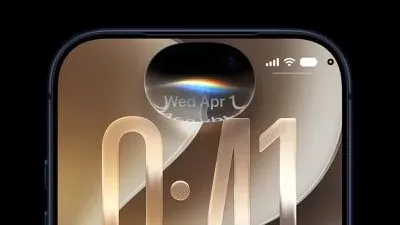
The visual identity changed along with the functionality. Siri’s icon and the glow animation around the Dynamic Island have been refreshed to better reflect how the new AI-driven Siri actually behaves — a subtler, more fluid animation replaces the older pulsing orb look. It’s a minor detail, but it signals how much Apple is treating Siri as a core part of the OS rather than a bolted-on assistant this time around.
Custom Siri voices — letting you pick how Siri actually sounds — require newer hardware (A19 Pro chip, found in the iPhone Air and iPhone 17 Pro), so this particular feature won’t reach most existing iPhones even after the update installs.
Smarter, Reorganized Lock Screen Widgets
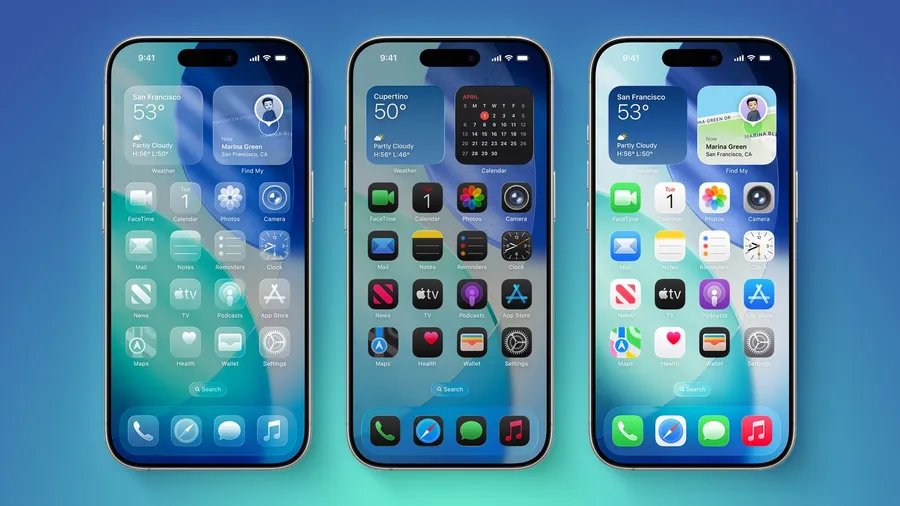
Widget layout on the Lock Screen has been quietly reworked. Weather and Find My widgets, for example, now sit in a slightly reorganized stack, making better use of the available space depending on what widgets you’ve chosen and how much information each one needs to show. It’s not a dramatic redesign, but if you rely on Lock Screen widgets daily, the improved spacing is a welcome, low-key fix.
Other Notable Changes
A few additional updates round out the release:
Search rebuilt from the ground up — indexing new content on your device almost instantly, and Mail’s internal search ranking has been overhauled to surface more relevant results.
Shared Albums in Photos now accept contributions from Android and Windows users — a genuinely overdue cross-platform fix.
Safari can organize open tabs into topics, monitor pages for changes, and build simple extensions from natural-language descriptions.
Health app is expanding into perimenopause and menopause tracking.
AirPods gain a new custom EQ option, and Apple Maps’ Fly Over feature looks noticeably more realistic thanks to improved intelligence models.
Under the hood, a reworked CPU scheduler aims to help older iPhones handle demanding tasks more smoothly, alongside smoother Wi-Fi-to-cellular handoffs.
Which iPhones Support iOS 27?
iOS 27 has a wide compatibility range — it supports every iPhone that could already run iOS 26, going back to the iPhone 11 and the second-generation iPhone SE. That said, not every feature reaches every supported device:
Apple Intelligence features (including most of the new Siri capabilities) require an A17 Pro chip or newer — that’s the iPhone 15 Pro and later.
Custom Siri voices specifically need an A19 Pro chip, limited to the iPhone Air and iPhone 17 Pro.
Everyone else on a supported device still gets the performance, Photos, Safari, Health, and Lock Screen improvements — just without the newest AI-driven Siri behavior.
Siri AI also won’t be available at launch in the EU or in China, where Apple is still working through regulatory requirements.
Should You Update Right Away?
If your iPhone supports Apple Intelligence (iPhone 15 Pro or newer), iOS 27 is worth installing once the stable release lands — the Siri improvements and wallpaper extension alone make it a meaningful update. If you’re on an older but still-supported iPhone (iPhone 11 through 14-series), you’ll still get the performance and app-level fixes, just without the AI headline features.
One general rule of thumb: back up your iPhone before any major iOS update, and if you’re currently on a public beta, know that features can still change before the final release ships.
Frequently Asked Questions
If your iPhone can currently run iOS 26, it can run iOS 27 — support goes back to the iPhone 11 and the second-generation iPhone SE.